
Social media automation: post from n8n, Make or Zapier with one HTTP step
Automate social media posting from n8n, Make or Zapier with one HTTP request: exact settings for each tool, checks, scheduling, webhooks and safe retries.
9 minute read By SocialHelper team
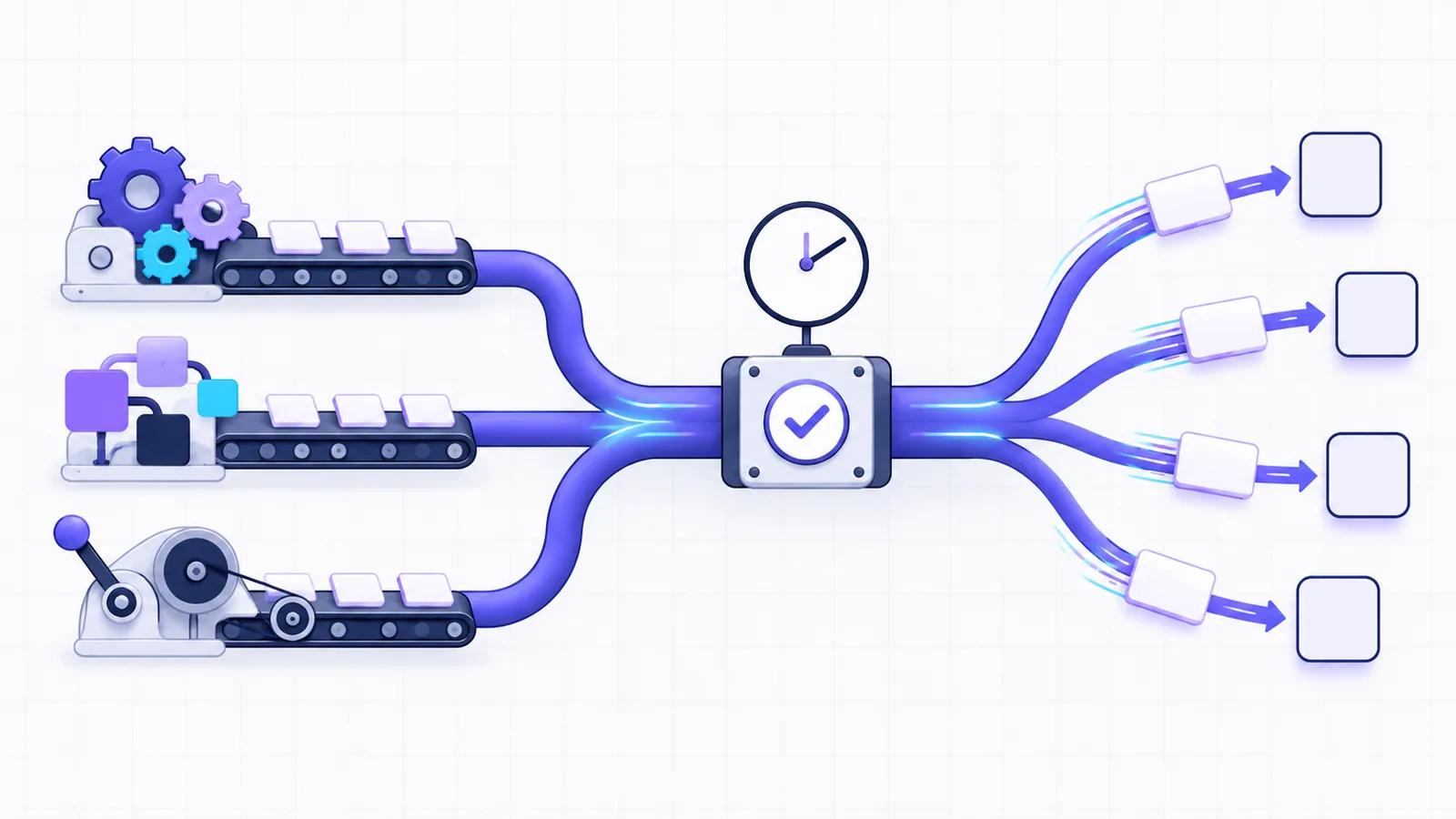
To automate social media posting with n8n, Make or Zapier, add one HTTP step that calls a posting API. The step sends POST /api/v1/posts with an API key, the post text and the IDs of the accounts to post to. The trigger before it can be a schedule, a new spreadsheet row, an RSS item or a form. None of the three tools needs a special SocialHelper app for this, because each has a built-in HTTP step.
Below are the exact settings for that step in each tool. After them come the parts that keep an automation safe to leave running: checks before posting, scheduling, results and retries. Every setting comes from the tools’ own docs, checked on October 17, 2026.
What social media automation is
Social media automation is software that does repeat posting work for you. It turns new items, such as a blog post, a product or a row in a content calendar, into posts and publishes them on time. An automation tool is an app that runs a chain of steps for you, and n8n, Make and Zapier are three of them. A trigger starts the workflow, the steps shape the data, and an action sends it somewhere.
Most templates for these tools post to each network with its own node or app. That means one login, one set of rules and one failure point per network. A posting API replaces them with one request. It checks the post against every network’s rules first, then publishes to all of them.
Platforms limit what an app may automate. Pinterest’s developer guidelines say that if an app schedules Pins, “the end user must choose each Pin to be published” (Pinterest: Developer guidelines). Bluesky counts “automated or bulk interactions” that notify people as spam (Bluesky: Developer Guidelines). Content a person approved, posted on a schedule, fits both rules.
The request every tool sends
Whichever tool you use, the HTTP step sends this request. Replace the account IDs with your own from GET /api/v1/accounts. Keep the API key in the tool’s credential store, not in the step itself.
curl https://socialhelper.app/api/v1/posts \
  -H "Authorization: Bearer $SOCIALHELPER_API_KEY" \
  -H "Content-Type: application/json" \
  -H "Idempotency-Key: $(uuidgen)" \
  -d '{
      "text": "New on the blog: how we bake our cinnamon rolls. Read it here: https://example.com/blog/cinnamon-rolls",
      "accounts": [
          "ACCOUNT_ID_1",
          "ACCOUNT_ID_2"
      ]
  }'
In the tool, replace $(uuidgen) with the trigger’s ID. The answer is 201 with the post and one target per account. If the text is too long for any account, or an image is the wrong type, you get 422 and nothing is posted. The reply lists every problem (posting docs). Each API key allows 120 requests a minute.
Two headers matter in an automation:
- Authorization carries
Bearer, a space and yoursh_key. - Idempotency-Key names the request, so repeats of it return the same result. It should come from the trigger, not from a random value. Use the row ID, the RSS item’s link or the form submission’s ID. If the tool runs the step twice for the same item, SocialHelper returns the first post with
200and posts nothing new (idempotency docs).
n8n: the HTTP Request node
n8n’s HTTP Request node can call “any app or service with a REST API”, and it can be set up from a curl command (n8n: HTTP Request node).
- Add a trigger. A Schedule Trigger runs the workflow at fixed times, or a Google Sheets trigger runs it for each new row. n8n’s docs say to “save and publish the workflow” for a schedule to run.
- Add an HTTP Request node. Select Import cURL, paste the request above and select Import. n8n fills in the method, URL, headers and body.
- Move the key into a credential. Delete the Authorization header. Then set Authentication to Generic Credential Type, then Bearer Auth, with your
sh_key as the token (n8n: HTTP Request credentials). - Map the fields. In the JSON body, replace the sample text with an expression from the trigger. Set the Idempotency-Key header from the row’s ID.
One catch: Import cURL “always imports any parameter values as strings”. If you build the body field by field, switch the body to Using JSON so accounts stays an array.
Make: the HTTP app’s Make a request module
Make’s HTTP app connects to “API services and applications that don't have an integration with Make” (Make: HTTP app). Use version 4 and its Make a request module.
- Set the authentication. Choose API key, then create a keychain. In Key, enter
Bearerand your key together, as in Make’s own example,Bearer 1234-5678-abcd-efgh. Place it in the header, withauthorizationas the parameter name (Make: API key authentication). - Set the request. Use method POST and the URL
/api/v1/postsonhttps://socialhelper.app. Add anIdempotency-Keyheader mapped from the trigger. - Build the body. Choose application/JSON and the Data structure input method, then map text and accounts into it.
The data structure matters because post text often has quotes and line breaks. Make’s docs say that with a data structure, reserved characters “will be escaped automatically”. With a plain JSON string, “you must escape them manually”, and one quotation mark in a post breaks the request.
Zapier: Webhooks by Zapier
Webhooks by Zapier sends HTTP requests from a Zap. Zapier lists it on every plan, including Free (Zapier: Send webhooks in Zap workflows).
- Add the action. Add a step, choose Webhooks by Zapier, and pick Custom Request as the event. Zapier recommends it for “Sending a nested JSON array”, and
accountsis one. - Set the request. Use method POST and the URL
/api/v1/postsonhttps://socialhelper.app. - Write the body. Paste the JSON body into Data and map the text from the trigger. Zapier sends it “exactly as entered”, so check it with a JSON validator, as Zapier suggests.
- Add the headers. Add
AuthorizationwithBearerand your key,Content-Typewithapplication/json, andIdempotency-Keymapped from the trigger.
The three tools side by side:
| Tool | HTTP step | Where the key goes |
|---|---|---|
| n8n | HTTP Request node, set up with Import cURL | Bearer Auth credential |
| Make | HTTP, Make a request, with a JSON data structure | API key keychain |
| Zapier | Webhooks by Zapier, Custom Request | Authorization header |
Images and video
A post with media takes two requests. First import the file from a public URL, then post with the media ID it returns.
curl https://socialhelper.app/api/v1/media \
  -H "Authorization: Bearer $SOCIALHELPER_API_KEY" \
  -H "Content-Type: application/json" \
  -d '{"url": "https://example.com/cinnamon-rolls.jpg",
       "alt_text": "A tray of fresh cinnamon rolls"}'
Add the returned id to the post’s media list. SocialHelper downloads the file, follows up to 3 redirects and checks its type from the contents. Images can be up to 60 MB here, and each network’s own limits are checked when you post (media docs). Instagram needs an image or video in every post, so an Instagram automation always has this step. The Instagram API guide explains why.
Check AI-written posts before they go out
If an AI step writes the post, check the result before it goes out. AI-written text can run past a network’s limit, and every network counts length its own way. Before the posting step, send the same body to POST /api/v1/posts/validate. It runs every check, saves nothing, and returns ok plus each account’s final text and its length against that network’s limit.
Add a filter after it in your tool. If ok is true, post. If not, send the problems back to the AI step or to a person. The guide to scheduling a week of posts with AI shows the same checks from an AI assistant instead of a workflow.
Schedule in the request, not the workflow
A workflow that publishes whatever is due each hour has to work every hour. It’s simpler to run it once and hand each post a time. Add scheduled_at to the body, as any ISO 8601 time with an offset.
{"text": "...", "accounts": ["..."], "scheduled_at": "2026-12-01T09:00:00-07:00"}That time can be up to 1 year ahead. SocialHelper checks every minute for posts that are due. It checks the content when you create the post, so a scheduled post can’t fail later for being too long (scheduling docs). A weekly workflow that reads next week’s rows from a social media content calendar and schedules each one is a good pattern.
Get the results back into your workflow
The request returns as soon as the post is accepted, and publishing happens after. To know how it went, have SocialHelper call your workflow. A webhook is a URL that receives a POST each time an event happens. Point a webhook at an n8n Webhook node, a Make Custom webhook or a Zapier Catch Hook. Each gives you a URL to receive data (Zapier: Trigger Zap workflows from webhooks).
| Event | Sent when |
|---|---|
post.published | Every account in the post was published |
post.partially_published | Some accounts were published and some failed |
post.failed | No account was published |
account.needs_reconnect | An account lost access and must be reconnected |
Each event carries the post with every target’s status and link, so the next step can write the links back to the spreadsheet row. Failed deliveries are retried up to 7 more times over about six hours. The SocialHelper-Delivery header stays the same on every retry, so use it to skip events you’ve already handled (webhook docs).
Retries without double posts
Automation tools retry failed steps, and a step can time out after the request has already gone through. The Idempotency-Key from the trigger covers that. Any retry of the same item returns the original post. Keep the same key when you retry after a 429 or a 500.
The other half happens inside SocialHelper. When a network gives an unclear answer, SocialHelper checks whether the post went out before trying again. Where a network can’t be checked, it stops instead of posting twice. The guide to never posting twice explains both halves.
Frequently asked questions
Which social media automation tool is best?
The one you already use. n8n, Make and Zapier can all send the same HTTP request, so the choice comes down to price, hosting and the triggers you need. Zapier lists Webhooks by Zapier on its Free plan. n8n can be self-hosted.
Can AI auto post on Instagram?
Yes, through the API, for Business and Creator accounts. An AI step writes the caption, and the workflow uploads the image and creates the post. Instagram doesn’t let apps post to personal accounts.
Can you automate posts on Instagram?
Yes. Connect a professional Instagram account, then send an image or video and a caption through the API, now or with scheduled_at. The post is checked against Instagram’s rules before it’s accepted.
Do I need a separate step for each network?
No. One request lists every account to post to, and each gets its own status. Use overrides to give one network different text, such as a shorter version for X or Bluesky.
What is an example of social media automation?
A content calendar in Google Sheets. Each week a workflow reads the next week’s rows, checks each post, and schedules it with its date and time. When a post goes out, a webhook writes its links back to the row.
How we checked this
We read the n8n, Make and Zapier docs for each setting on October 17, 2026, and ran a fact check of every quote against them. The request examples follow SocialHelper’s API docs, and the example request is sent to the real API in our test suite. We analyzed SocialHelper’s code on October 17, 2026 and found no built-in n8n, Make or Zapier integration. Every route here is the HTTP request any tool can send.
If you spot something that has changed, contact us and we’ll correct it.


